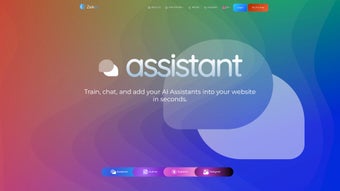

Download ZekAI – AI‑Driven Marketing Tools for Retailers
Overview
ZekAI is a web‑based, AI‑powered marketing platform built especially for retailers who need to produce high‑quality promotional content at speed. By blending natural‑language generation, image synthesis, and document‑analysis into a single suite, ZekAI eliminates the traditional bottlenecks of copywriting, design, and research. Whether you are a small boutique looking to fill product pages with SEO‑optimized descriptions or a large chain that must keep dozens of social‑media channels fresh, ZekAI’s four core applications—Assistant, Author, Explorer, and Designer—work together to turn a simple idea into a fully polished marketing asset.
The platform’s AI models are trained on retail‑specific language, which means the output feels relevant, persuasive, and ready for conversion‑focused campaigns. In addition to content creation, ZekAI also offers grammar correction, multilingual translation, and a smart “document explorer” that can answer questions based on uploaded PDFs or spreadsheets, making it a truly all‑in‑one marketing assistant. Because it lives in the browser, there is no heavy software to install, and updates roll out automatically, ensuring you always have the latest AI improvements without the hassle of manual patches.
For retailers that value speed, consistency, and data‑driven copy, ZekAI presents a compelling, secure, and cost‑effective alternative to hiring multiple freelancers or agencies.
Core Features of ZekAI
- Assistant: Real‑time chat interface that helps you brainstorm taglines, product benefits, and ad copy in seconds.
- Author: Generates SEO‑optimized product descriptions, blog snippets, and email newsletters with built‑in keyword density controls.
- Explorer: Upload PDFs, CSVs, or image catalogs and ask natural‑language questions; the AI extracts insights, pricing tables, or trend analyses instantly.
- Designer: Text‑to‑image generation that creates marketing graphics, banners, and social‑media visuals without any design experience.
- Grammar & Style Checker: Automatic proofreading that highlights errors, suggests tone adjustments, and aligns copy with brand voice guidelines.
- Multilingual Translation: One‑click conversion of product copy into 30+ languages, preserving SEO relevance across markets.
- Template Library: Pre‑built frameworks for holiday promos, flash sales, and seasonal catalogs, ready to be customized.
- Secure Cloud Storage: All generated assets are saved in an encrypted workspace, accessible from any device with role‑based permissions.
- Continuous Learning: The AI adapts to your brand’s style over time, improving relevance with each interaction.
- Integration Ready: Simple API hooks for Shopify, Magento, WooCommerce, and major email‑marketing platforms.
These features are not just a collection of isolated tools; they are intentionally interconnected. For example, a retailer can use Explorer to pull product specs from a supplier catalog, feed the extracted data into Author for a polished description, and then hand the text off to Designer for a matching visual. The resulting workflow can be completed in under ten minutes—a process that would normally require a copywriter, a graphic designer, and a QA specialist. ZekAI’s AI models also incorporate the latest best practices in conversion copy, such as power‑verb placement, scarcity triggers, and A/B‑test‑ready variants, allowing marketers to experiment quickly and measure impact. The platform’s ability to generate content that is both search‑engine friendly and conversion‑oriented makes it a dual‑purpose asset: it drives organic traffic while simultaneously supporting paid advertising campaigns.
Getting Started: Installation & Usage Guide
Because ZekAI is a fully cloud‑hosted solution, there is no traditional installation process. Getting up and running is as simple as creating an account, selecting a subscription tier, and accessing the dashboard from any modern browser. Follow these steps to start creating marketing assets in minutes:
- Sign‑up & Verification: Visit the ZekAI homepage, click “Get Started,” and enter your business email. A verification link will be sent to confirm ownership.
- Select a Plan: ZekAI offers a free trial with 20 content generations per month, a “Growth” tier for small retailers (unlimited text, 200 images), and an “Enterprise” tier with dedicated support and API access. Choose the plan that matches your volume.
- Configure Brand Settings: In the Settings panel, upload your logo, define brand colors, and input tone guidelines (e.g., “friendly,” “authoritative”). This information feeds the AI’s style engine.
- Explore the Workspace: The main dashboard presents four tabs—Assistant, Author, Explorer, Designer. Each tab contains a clean input field, optional context upload, and a “Generate” button.
- Create Your First Asset: For a product description, navigate to Author, paste the SKU or product name, select target keywords, and click Generate. Review the output, make minor edits if needed, and click “Save to Library.”
- Design Visuals: Switch to Designer, type a prompt like “summer‑sale banner with pastel colors and a beach vibe,” and let the AI render three variations. Download the preferred PNG or directly push it to your Shopify store via the integration button.
- Leverage Explorer: Upload a PDF of your latest supplier catalog, ask “What are the top three selling items for the upcoming holiday season?” and receive a concise list ready for promotion.
- Publish & Track: Use the built‑in scheduler to push content to Facebook, Instagram, or email newsletters. ZekAI tracks impressions and suggests headline tweaks based on real‑time performance.
Security is baked into every step. All data transfers occur over TLS 1.3, and content is stored in encrypted buckets that comply with GDPR and CCPA. If you need to collaborate with a team, invite members with role‑based access (Editor, Viewer, Admin) to keep workflows organized. The platform also supports single sign‑on (SSO) via SAML for larger enterprises, ensuring that user management aligns with existing IT policies.
System Compatibility, Pros & Cons
ZekAI is a web‑application optimized for all major browsers (Chrome, Edge, Firefox, Safari) on Windows 10/11, macOS Ventura and later, as well as Linux distributions that support the latest Chromium engine. Because the interface is responsive, you can also access ZekAI on tablets running iOS 15+ or Android 12+ using the browser, though a full‑screen desktop experience is recommended for heavy design work.
Pros
- All‑in‑one suite eliminates the need for multiple subscriptions.
- AI models are retail‑focused, producing copy that resonates with shoppers.
- Text‑to‑image generation removes the learning curve for design.
- Secure cloud storage and GDPR‑compliant data handling.
- Scalable API for developers who want to embed ZekAI into existing workflows.
- Free trial provides a risk‑free way to evaluate the platform.
Cons
- Reliance on internet connectivity; offline usage is not supported.
- Higher‑tier plans can be pricey for very small retailers.
- Image generation quality varies with complex prompts; may need post‑editing.
- Learning curve for advanced features like Explorer queries.
- Limited native integration with legacy e‑commerce platforms (requires API work).
Frequently Asked Questions & Final Verdict
Is ZekAI suitable for non‑technical users?
Absolutely. The dashboard is built with a drag‑and‑drop interface and plain‑language prompts, so users without coding or design backgrounds can generate copy and images by simply typing what they need. Tutorials and a knowledge base are also provided.
How does ZekAI handle multilingual content?
ZekAI includes a built‑in translation engine that supports over 30 languages. When you generate a product description, you can toggle the “Translate” button to instantly receive SEO‑friendly versions in the selected language, preserving keyword placement and brand tone.
Can I integrate ZekAI with my existing e‑commerce platform?
Yes. ZekAI offers native plugins for Shopify, Magento, and WooCommerce. For other platforms, the RESTful API lets developers push generated copy or images directly into product pages, newsletters, or ad accounts.
What security measures protect my data?
All data in transit is encrypted with TLS 1.3, and at rest it is stored in AES‑256 encrypted storage. ZekAI complies with GDPR, CCPA, and ISO 27001 standards. Enterprise customers can enable SSO and IP‑whitelisting for added control.
Is there a free version or trial available?
ZekAI offers a 14‑day free trial that includes 20 text generations and 5 image renders. This allows retailers to test the platform’s capabilities before committing to a paid plan.
**Final Verdict:** ZekAI stands out as a versatile, AI‑driven marketing companion tailored for the retail sector. Its combination of copywriting, image creation, and document exploration reduces reliance on external agencies and accelerates time‑to‑market for promotions. While the subscription cost may be a consideration for micro‑businesses, the productivity gains and consistency of brand messaging often outweigh the expense. If you are looking for a secure, cloud‑native solution that can scale with your catalog size and marketing ambitions, ZekAI is worth a serious test run. Ready to transform your product listings and ad creatives? Click the button below to start your free trial and experience the future of retail marketing today.



.png)



